
Elastic Search
Magento 2 Elastic Search extension is an advanced solution which provides your store with highly accurate, fast and flexible search.
- Autocomplete suggestions & spell corrections
- Partial search by SKU, name, attributes, category
- Product attribute weight settings
- Synonyms & stop words
- Multi-lingual search
- Responsive & mobile-friendly
WHY USE ELASTICSEARCH WITH MAGENTO 2?
Since 2010, Elasticsearch is known as a powerful open-source search & analytics engine. The stack of technologies comprises autocomplete search, autocorrection for misspelled words, synonym results, a full-text search involving all your site content and more. Moreover, store owners can customize it to their store unique showings. Thus, Magento 2 Elastic Search covers any merchant’s basic needs – it reduces search time and improves the customer experience, which has a positive effect on conversions.
HOW TO CONFIGURE ELASTICSEARCH ENGINE IN MAGENTO 2?
- Log in to your backend and go to Click Stores > Settings > Configuration > Catalog > Catalog > Catalog Search;
- In the Search Engine line, pick the needed Elasticsearch version;
- Specify the server configurations or skip this step if you want to use default settings;
- Test the connection.
How does the ElasticSearch technology
make searching faster?
It optimizes search performance, returning relevant search results from various directories
It significantly speeds up your catalog layered navigation and smoothes shoppers browsing on any device
It has a thoroughly improved indexing, that works simultaneously with a limitless number of products
Why Is Elastic Search So Efficient?

FAST
With Magento 2 Elasticsearch, everything is properly indexed – this is one of the reasons why customers receive the most relevant data instantly.

FLEXIBLE
Shoppers can use any type of data: structured or unstructured, text or numbers. Let them freely search by SKU, product name, attributes, full and short description, etc.

MULTIPLEX
Specify search type and weight for each product attribute individually. Furthermore, your customers can search full text content through any tier as CMS pages and blocks.
HOW DOES INDEXING VIA ELASTICSEARCH WORK?
To ensure logical storing of scattered data and its faster processing, our Elasticsearch uses indexes. The indexes come with long-term persistence thanks to the native ‘gateway’ feature of the Elasticsearch engine. Thus, you achieve fast page loading and the option to recover all the indexes exactly from the gateway in case of a server technical problems or even crash.
Due to Elastic Search Engine 5.x and 6.x support it indexes many products simultaneously
It works precisely since it was significantly reworked and upgraded
Various architectural patterns as structure and data mappers were clearly revised
Enrich Your Shoppers’ Search Experience With Cutting-Edge Features
Since all centers around the customers with their longing to find something special, ElasticSearch for Magento 2 takes a search in e-commerce with all the seriousness it deserves. Based on powerful ElasticSearch engine, the extension copes with the variety of shoppers appetites to respond with accuracy that will impress them, and naturally smooth their experience.
Make data-driven decisions with a smart Search Analytics tool
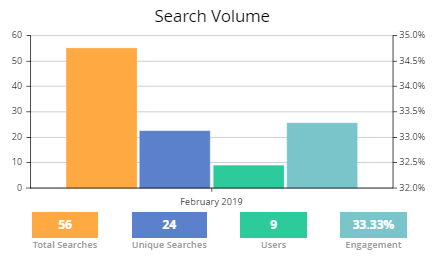
Access the data on your store’s search volume with the next values:
- total searches;
- unique searches;
- the number of users;
- users’ engagement.
The engagement statistics includes page jumps to Brands, Categories, Blog, CMS & Landing pages. Also, you have the ability to monitor customers’ recent activity and the most wanted search terms.
Extensible Search Query
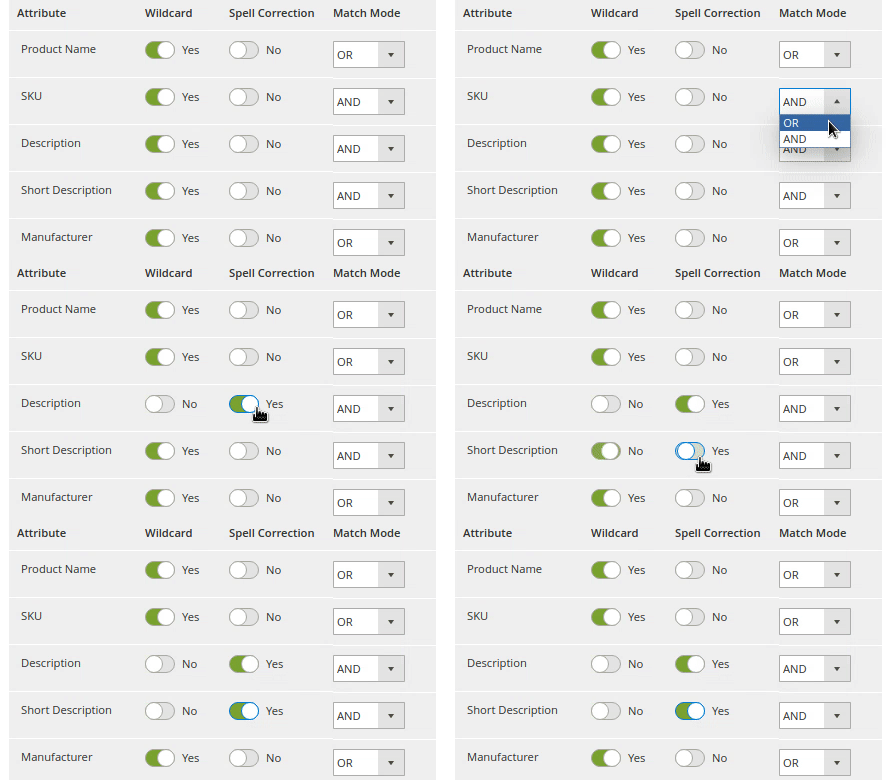
The settings allow you to specify the search types for each product attribute – SKU, name, description. Configure elastic search query in your Magento 2 store to allow a search with autosuggestion or spell autocorrection.
NEW | If a customer searches by SKU of a not visible child product, the parent product will be shown as a result.
Match Modes
For each product attribute, you can specify how the keywords will be combined. E.g., AND provides a search for cases when all the requested words occur altogether.
Promote your featured products first
Run marketing campaigns to promote certain products by boosting or lowering their relevance score in the search results. Using conditions with product attributes, return promo products in the top of the results.
Product Attribute Weight
Your customers will get more precise results, when you specify search weight for product attributes. This will be implemented in the search algorithm.

Autocomplete Suggestions
Present more relevant time-saving search results with advanced autocomplete window. And employ a wildcard partial search to make the shoppers’ experience even easier.
Spell Correction
Specify the error tolerance to prevent confusions which may accidentally happen when shoppers type their requests. Avoid no search results pages caused by typos or misspellings.
Long-tail Search
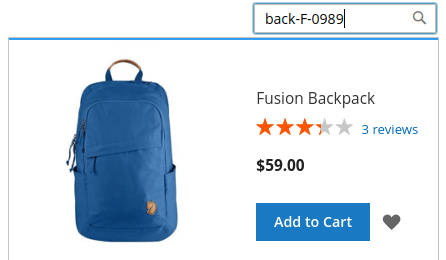
It is especially convenient when customers input compound queries that contain hyphens, slashes or any other non-alphabetic symbols. The feature provides precise results when the customers search by SKU, MPN (manufacturer part numbers), or product names with symbols.
Fallback Search
With the fallback feature, return alternative variants, when there are 0 found items. Offer your customers other similar products automatically.
Results for categories, CMS, brand, landing pages
In the search pop-up, there is a handy section with links to the categories, brand, blog, CMS and landing pages that contain search results.
‘Add to Cart’ and ‘More Products’ buttons
Boost sales by letting customers add products to their carts right from the popup window. Display products reviews and a ‘More Products’ button to give shoppers possible alternatives.
Recent and Popular Searches
Display clickable popular and recent searches to let your customers be aware of trends and offer them worth-while products.
Manage cron tasks on a Cron Tasks List grid
As the Elastic engine searches in the tables that are updated and reindexed by cron, you can easily apply relevance rules by running the particular cron job.
Synonym Results
Add alternative product names to build your dictionary of synonyms, concerning your catalog. Make sure that customers will find things they need regardless of how they call them.
Full Text Content Search
Let your customers search through all the content of your web store. The extension returns the full text results within CMS pages and blocks.

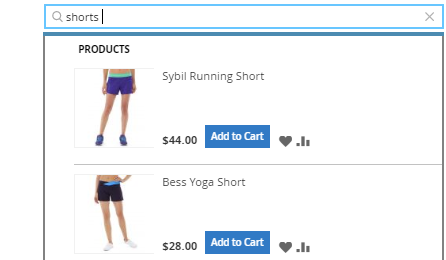
Singular/Plural Forms Search
Smart stemming technology understands singular and plural search queries and identifies words by their root forms. It means that the extension returns the same results for both “short” and “shorts” queries.
Custom Analyzers
Elastic Search is fully compatible with Asian languages. The extension includes custom analyzers for Japanese, Chinese and Korean languages to provide optimal shopping experience on a global level.
MAGENTO 2 ELASTICSEARCH: FEATURES AND TWEAKS
- Multi-lingual search
- One result redirect to product page
- Customizable autocomplete window layout
- Display out-of-stock items last
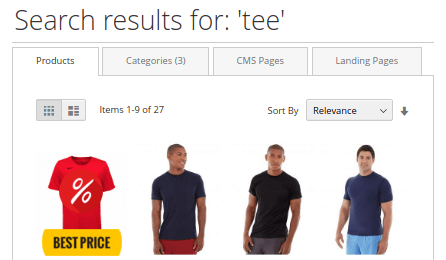
- Search results tabs for Categories, CMS, Landing pages
- Specify SEO URL key for the default search results page
- Redirect to the search results from broken URLs
- Full category path in a search pop-up
- Exclude stop words from the search results